wolfun
USB Microphone, Condenser Computer Microphone for Streaming, Gaming, Youtube Recording, Plug and Play,Headphone Output and Volume Control,Quick Mute Button,Compatible with Laptop, Phone (Black)
USB Microphone, Condenser Computer Microphone for Streaming, Gaming, Youtube Recording, Plug and Play,Headphone Output and Volume Control,Quick Mute Button,Compatible with Laptop, Phone (Black)
Couldn't load pickup availability
- [Plug and Play]: Wolfun USB Microphone is directly connected to the USB 2.0/ type-c port, plug and play, without any additional drivers. Wolfun provides a 5-foot USB data cable that can be plugged into your device and operate recording easily.
- [Cardioid Pickup Pattern]: The unique cardioid pickup design can pristine and accurate capture that accurately picks up the sound from the front of the microphone, and effectively reduces the noise source, to give you a clearer, true-to-the-original vocals and acoustic instruments.It is compatible with computer, PC, laptops, widely applied to streaming, Skype chatting, video recording, podcasting, recording, YouTube, et.
- [ Mute Button and Headphone Output]: One-click to mute/unmute your PC microphone,built-in headphone output , volume and Echo adjustable. The Build-in LED indicator can visually display the working status at any time(Red light: mute, green light: working).
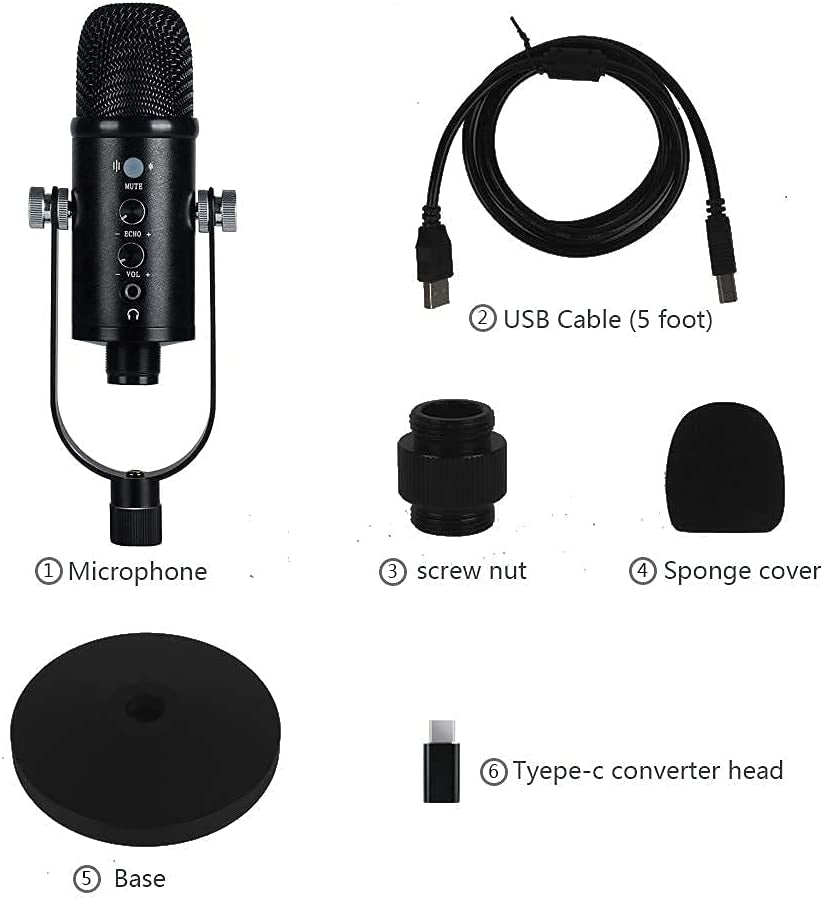
- [What You Get]: 1 x Microphone , 1x USB Data Cable (5 foot), 1 x Shock-absorbing base, 1 x Tyepe-c converter head, 1 x Sponge cover and 1 x Manual. (Note: Do not place the microphone too close to the wall and power supply. )
- [After-sales policy]: If you encounter problems when using this product, please refer to the manual first. If you still have any questions, please feel free to contact us, We will reply you within 24 hours and provide you with a satisfactory solution (replacement or refund).
Product Description
Mute ButtonOne-click mute/unmute PC microphone. The built-in LED indicator can visually display the working status at any time. | Echo EffectRotate to increase/reduce the reverb effect. ECHO is recommended to be turned off during video conferencing and internet classes. | Easy Volume ControlRotate to increase/decrease the output sound of the microphone. Conveniently and quickly realize volume control. |
Note
1. Please use USB port to connect the microphone.
2. Do not cover the microphone grille with your hands.
3. The sound should be 58.5 in to 117 in far away from the microphone in the forward direction, keeping the microphone at 45 angle.
4. When the microphone is connected to a mobile phone, please make sure that the mobile phone has a type c interface.
5. Regular maintenance is recommended and pay attention to dust and moisture to avoid the electrical instability and acoustic problems of the microphone